How to Build Your First 10 Links: An Ahrefs Case Study for a New Mini-Site


Your Aged Domain’s DR Isn’t Enough
In our last two posts, we completed the “Digital Archaeologist” method to value acmetech.com and then used Ahrefs competitor analysis to build a content plan for its pivot into the WordPress niche.
We have a DR 30 domain, a clear content strategy, and a list of competitors. We’re ready, right?
Not quite.
An aged domain’s DR 30 score only gets you in the game. It’s like having a car with a good engine, but no new fuel. To win, Google needs to see new, relevant, high-quality links pointing to your new content. This is the single most important signal that your “forgotten” site is now a living, valuable, and trustworthy resource.
But how do you get links for a brand-new mini-site in a competitive niche? You don’t guess. You use Ahrefs to create a surgical, data-driven link-building plan. Here is my exact workflow.
Step 1: Find What Type of Content Earns Links
Our first mistake would be to assume that the content getting the most traffic also gets the most links. Let’s test this.
In our last post, we saw competitors like Kinsta get massive traffic from technical troubleshooting guides (e.g., err_ssl_protocol_error). But is that what people link to?
Let’s plug our competitor kinsta.com/blog into Ahrefs Site Explorer and look at the Best by links report, sorted by Referring Domains.
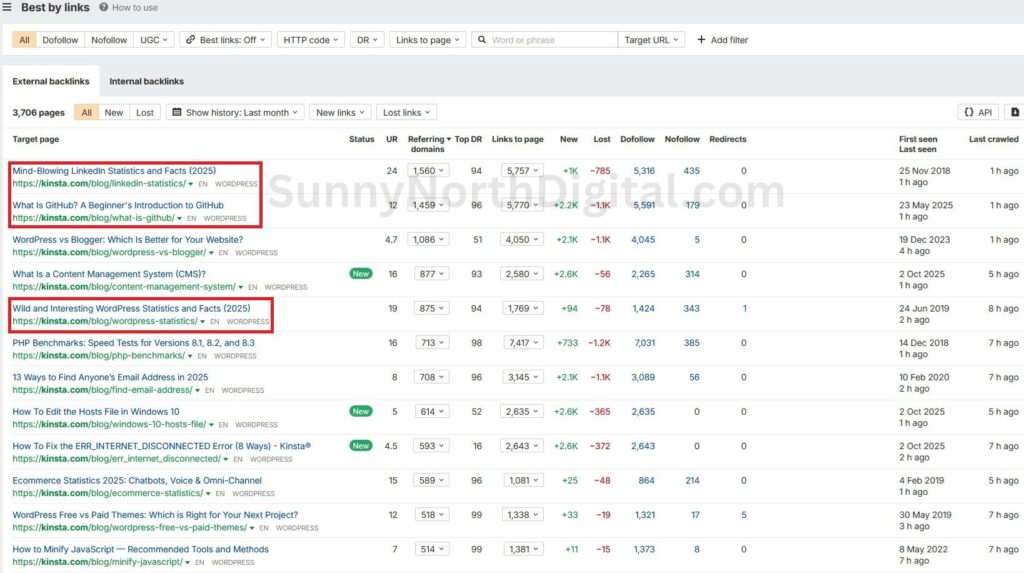
What This Tells Us
This is a critical, AI-proof insight. The content that gets traffic (hyper-specific error codes) is not the same content that earns links.
In the WordPress niche, “linkable assets” are:
- Data-Driven Reports: “LinkedIn Statistics”
- Foundational Guides: “What is GitHub?”
- Deep Dives: “WordPress vs Blogger”
This tells me that our content plan for acmetech.com must include one or two of these “linkable assets.” While our affiliate “best of” listicles will make money, a big data-heavy post is what will attract new, high-authority links and build our site’s DR.
This ‘linkable asset’ is often the first, most important post you write. I created a full guide on how to plan this ‘Topical Bridge’ post using Semrush’s content tools.
Pro-Tip: The most powerful ‘linkable asset’ of all isn’t a single post, but an entire topical cluster that establishes you as an undisputed expert.
Step 2: Find Replicable Links (The “How”)
Now we know what to create. Next, let’s find where to get links.
I’ll pick a relevant competitor article that’s similar to what we plan to write, like Kinsta’s “WordPress Free vs Paid Themes” post. It has links from over 1,000 domains. Let’s open the Backlinks report for that specific URL.
I’m not just looking at the DR of the linking sites. I’m scanning the “Referring page” and “Anchor” columns, asking one simple question: “Can I replicate this?”
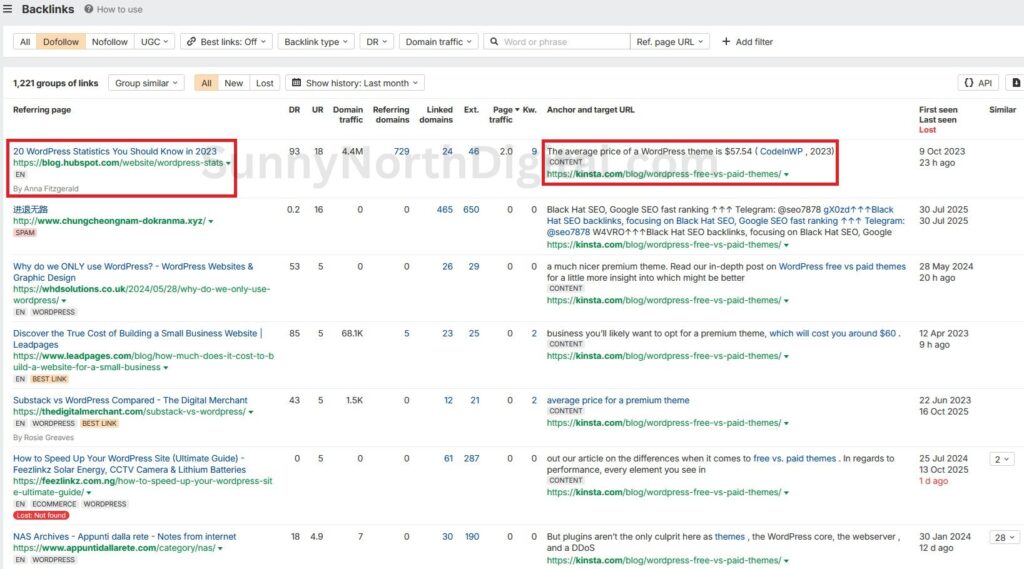
What This Tells Us
This single backlink gives us a complete link-building strategy.
- The Link: A DR 93 link from HubSpot.
- The “How”: HubSpot’s article (“20 WordPress Statistics”) cited Kinsta’s post as a source for a specific data point (“the average price of a WordPress theme is $57.54”).
- Our Opportunity: This is a data-driven citation link. If we create a better, more current statistics post for
acmetech.com(e.g., “WordPress Plugin & Theme Pricing: 2026 Report”), we can outreach to HubSpot and other sites that linked to Kinsta’s old data and ask them to update their link to our new, fresher resource.
Let’s look at another one from the same report.
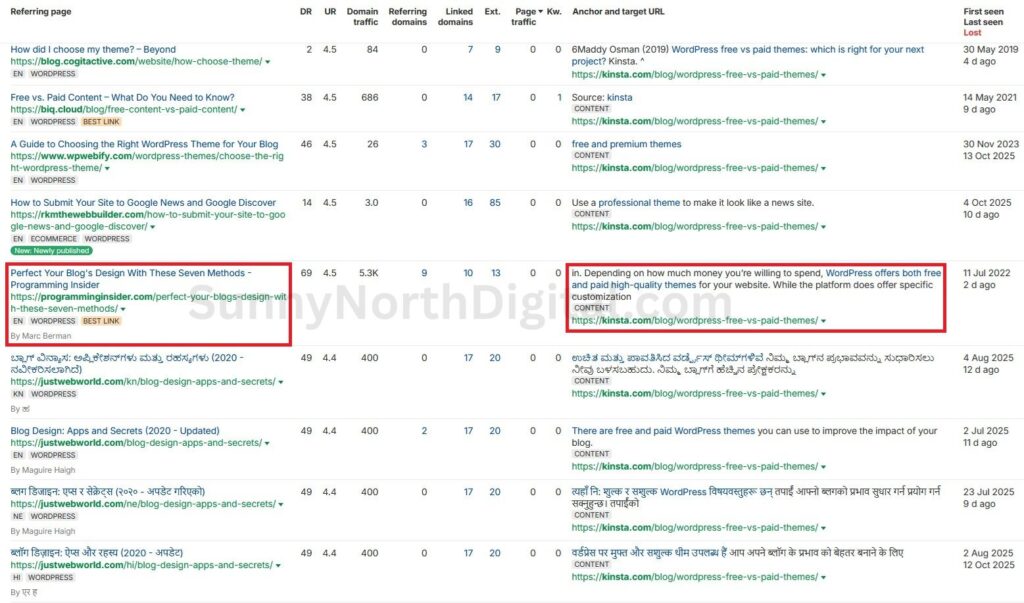
Our Opportunity: This is likely a guest post or a resource link. programminginsider.com is now on my outreach list. I can pitch them a new, relevant guest post, or I can email the editor, show them my new article, and ask if they’d consider adding it as a resource.
Step 3: Find Who Links to Your Competitors (But Not to You)
This is the final and most powerful step. We will use Ahrefs to build a high-priority outreach list.
Go to the Link Intersect tool (under “More” in Site Explorer).
- Put your domain (
acmetech.com) in the “But doesn’t link to” field. - Put your top competitors in the “Show me who links to…” fields. I’ll use
wpbeginner.com,kinsta.com/blog, andblog.sucuri.net.
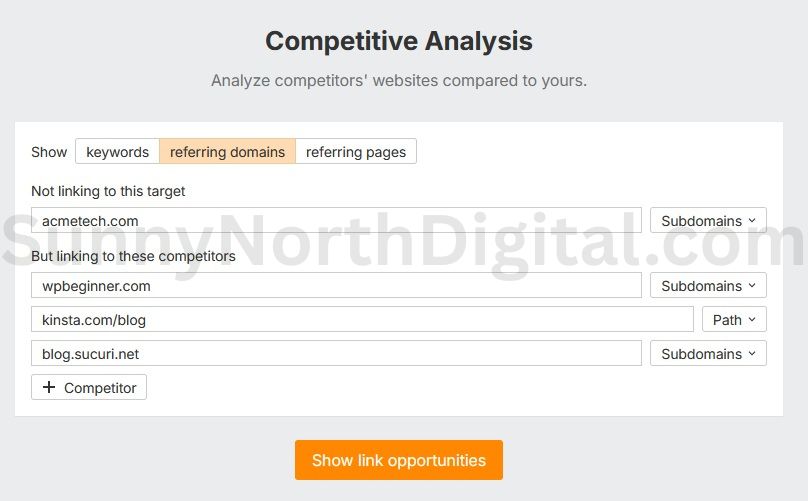
Now, let’s run the report.
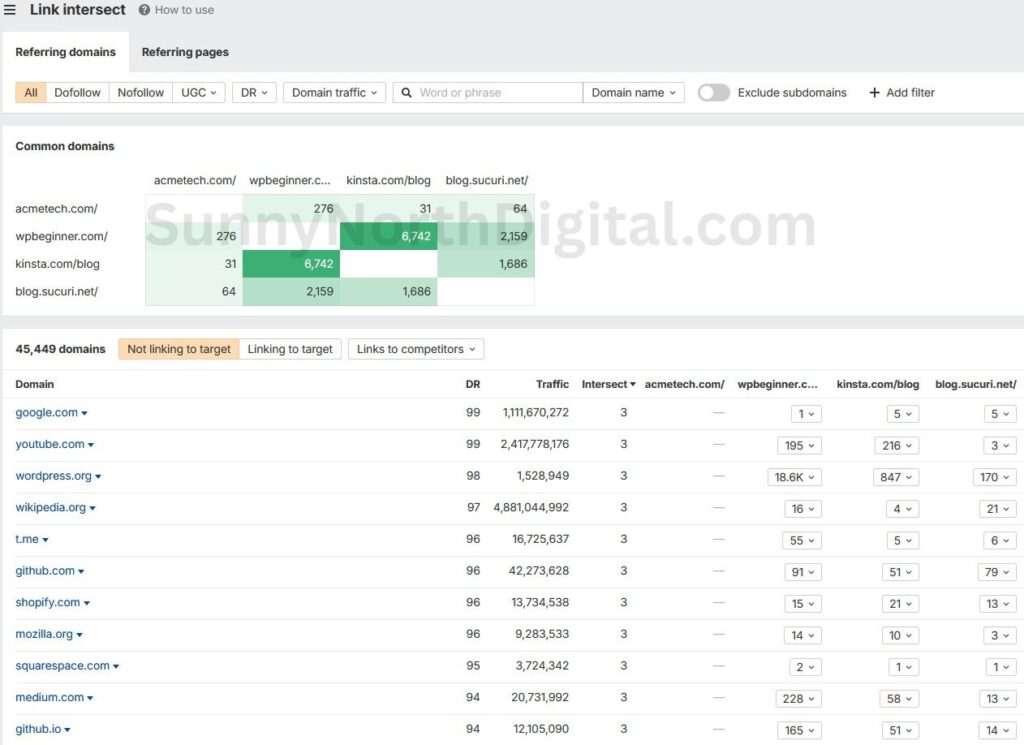
What This Tells Us
This is our “warm leads” list. The report shows thousands of domains that link to at least one of our competitors. These sites are already interested in the WordPress/Tech niche.
From here, I filter the list to find the best targets. For example, the data shows 6,742 domains link to both WPBeginner and Kinsta. These are the “Pillars of the Community” (like smashingmagazine.com, css-tricks.com, yoast.com). These are long-term goals.
For our first 10 links, I’ll filter this list for sites with DR between 30-70 that link to all three competitors. These are active, relevant blogs and resource sites—the perfect targets for our guest posting and resource page outreach.
Your First 10-Link Roadmap
By following this 3-step Ahrefs workflow, you are no longer guessing. You have a data-driven plan to build your first 10 high-quality links.
- Analyze
Best by links: To find what kind of content to create to attract links (e.g., data/stats posts, foundational guides). - Analyze
Backlinksreports: To find how competitors got specific links and identify replicable guest post and resource page opportunities. - Use
Link Intersect: To build a high-priority outreach list of sites that are already linking to your competitors.
This isn’t “spraying and praying.” This is a surgical link-building plan. You now have a data-driven content strategy and a surgical backlink strategy. You’re not just rebuilding an old site; you’re launching a strategic competitor.
Building links is only half the battle; you also need to know if they are moving the needle. Learn how to set up a 30-day audit dashboard to track the impact of your new links.