The “Content Cluster” Architect: How to Create a Topic Cluster with Semrush


Why One Post Fails
You’ve built your mini-site. You’ve written your first “Topical Bridge” post. You’ve even started building links.
But if you stop there, your site is just an island.
A single “perfect” article, no matter how good, rarely builds enough topical authority to dominate a niche. Google needs to see a continent of expertise, not just a lonely island. To escape the “Sandbox” and rank for competitive terms, you need to surround your pillar content with a supporting network of related articles.
You need a Topic Cluster.
In this guide, I’m going to show you my exact workflow for being a “Content Architect.” I’ll use Semrush’s Topic Research and Keyword Magic tools to turn a single keyword into a connected, 10-article map that forces Google to see you as an expert.
Step 1: Visualizing the Hub (Topic Research Mind Map)
First, we need to define our “Hub” (or Pillar). This is the core topic we want to own.
From our previous content strategy guide, we identified wordpress monetization as our “Bridge Topic.” Now, let’s see what that cluster actually looks like.
Tool: Semrush Topic Research.
I enter wordpress monetization and switch the view to Mind Map.
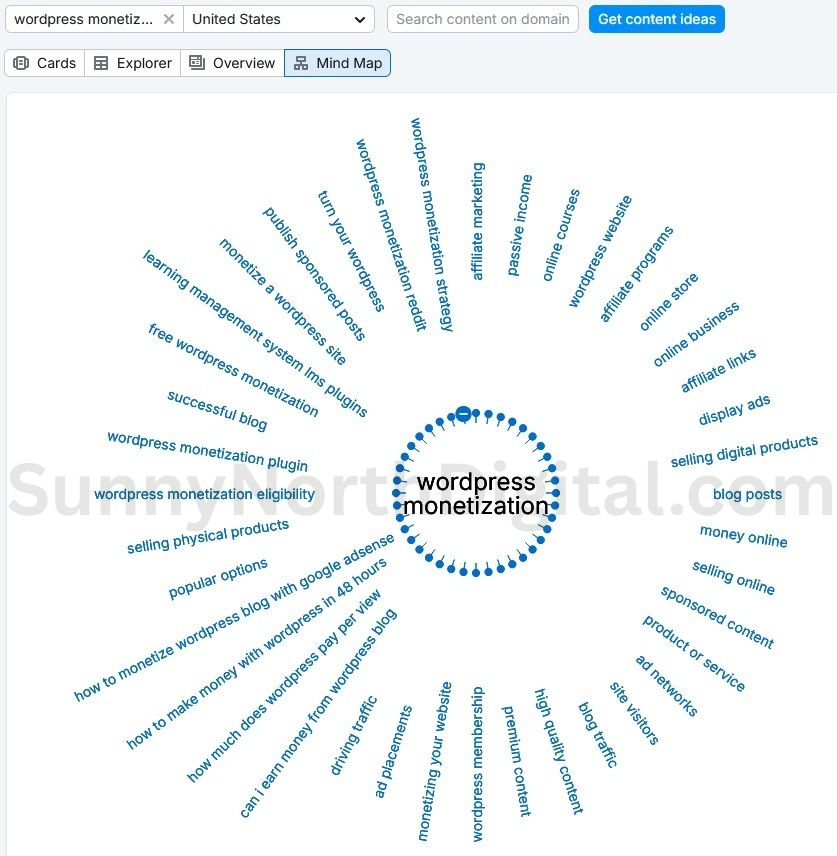
Analytical Insight: This tool does the heavy lifting of architecture. It shows me that “Affiliate Marketing” and “Ad Networks” aren’t just random ideas; they are semantically connected sub-topics that Google expects to see near my main topic.
Step 2: Identifying the “Spokes” (The Questions)
A “Spoke” article isn’t just a smaller version of the Hub. It answers a specific question.
In the Topic Research tool, I click on the “Affiliate Marketing” card to open the Explorer view.

The Strategy:
My screenshot (Fig 2) will show me a list of real headlines and, most importantly, user questions and related searches. My “Spoke” articles will be based directly on this data.
For example, the “Related searches” in Semrush show high-intent queries like:
"Best wordpress monetization affiliate marketing""How to start wordpress monetization affiliate marketing"
My Spoke article titles are no longer a guess. They become:
- Hub: The “Topical Bridge”: How to Monetize a WordPress Blog
- Spoke 1: A Beginner’s Guide to Starting with WordPress Affiliate Marketing
- Spoke 2: What are the Best WordPress Affiliate Marketing Plugins? (A Review)
This ensures every post solves a unique, data-validated problem while supporting the main theme.
Step 3: Validating the Traffic Potential
Before I write a single word, I must verify that my “Spokes” are worth the effort. I don’t want to write an article that no one searches for.
Tool: Semrush Keyword Overview (Bulk Analysis).
I take my top 3 Spoke ideas and plug them in to check their volume and difficulty.
wordpress affiliate marketingsell digital products wordpresswordpress ad networks
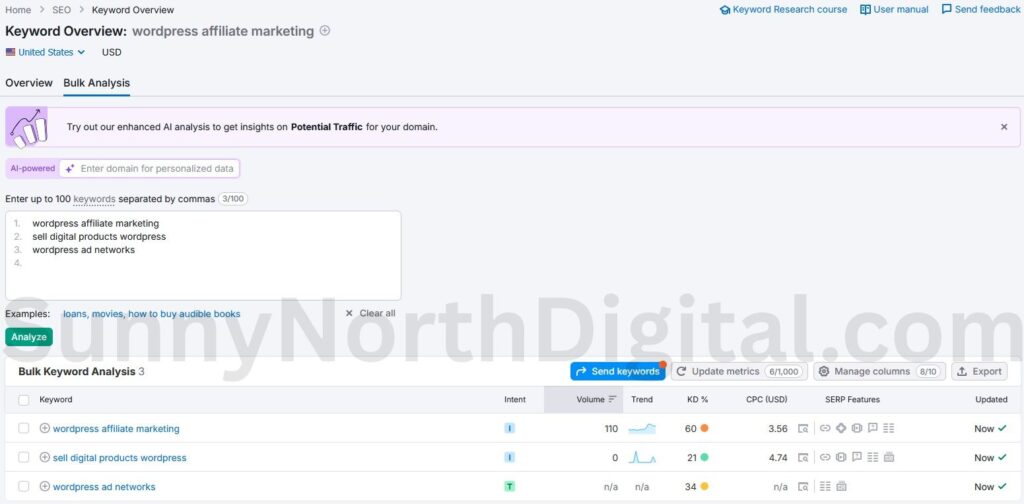
Analytical Insight: This proves that my Spokes can stand on their own. wordpress affiliate marketing has volume. sell digital products wordpress has high commercial intent. Each of these posts will bring in its own traffic while boosting the authority of the Hub. These are two of the 5 proven ways to monetize an expired domain.
Step 4: The Interlinking Blueprint
Now we have our Hub and our Spokes. The final piece of the puzzle—and the one most people miss—is the wiring.
To force Google to see this as a cluster, you must link them correctly. Here is the exact Interlinking Blueprint I follow:
1. The Pillar Page (Hub)
- Topic:
WordPress Monetization - Linking Rule: Must link out to every single Spoke article in the body content (e.g., “One of the best ways is [affiliate marketing]…”).
2. The Sub-Pages (Spokes)
- Spoke A:
Affiliate Marketing- Linking Rule: Must link BACK to the Pillar Page in the first 100 words (e.g., “This is a key part of [WordPress monetization]…”).
- Spoke B:
Selling Digital Products- Linking Rule: Must link BACK to the Pillar Page and laterally to Spoke A (e.g., “Unlike [affiliate marketing], digital products require…”).
3. The “Authority Signal”
- Insight: By linking the Spokes back to the Hub, you funnel all the authority from your specific, long-tail keywords up to your main, high-volume Pillar page.
Dominating the Niche
You aren’t just writing articles; you are building a library.
By using Semrush to architect a Topic Cluster, you move from being a “blogger” to being a “topical authority.” This structure helps you escape the Sandbox faster, rank for more keywords, and build a defensible moat around your niche.
This is how you scale from a “Mini-Site” to a true “Authority Asset.”
Once you’ve built your cluster, don’t forget to track its performance. Use my 30-Day Audit Dashboard to watch your topical authority grow.